HiHi User Resources
SEARCH
No results please try again
-
Getting Started
-
Overview of home screen
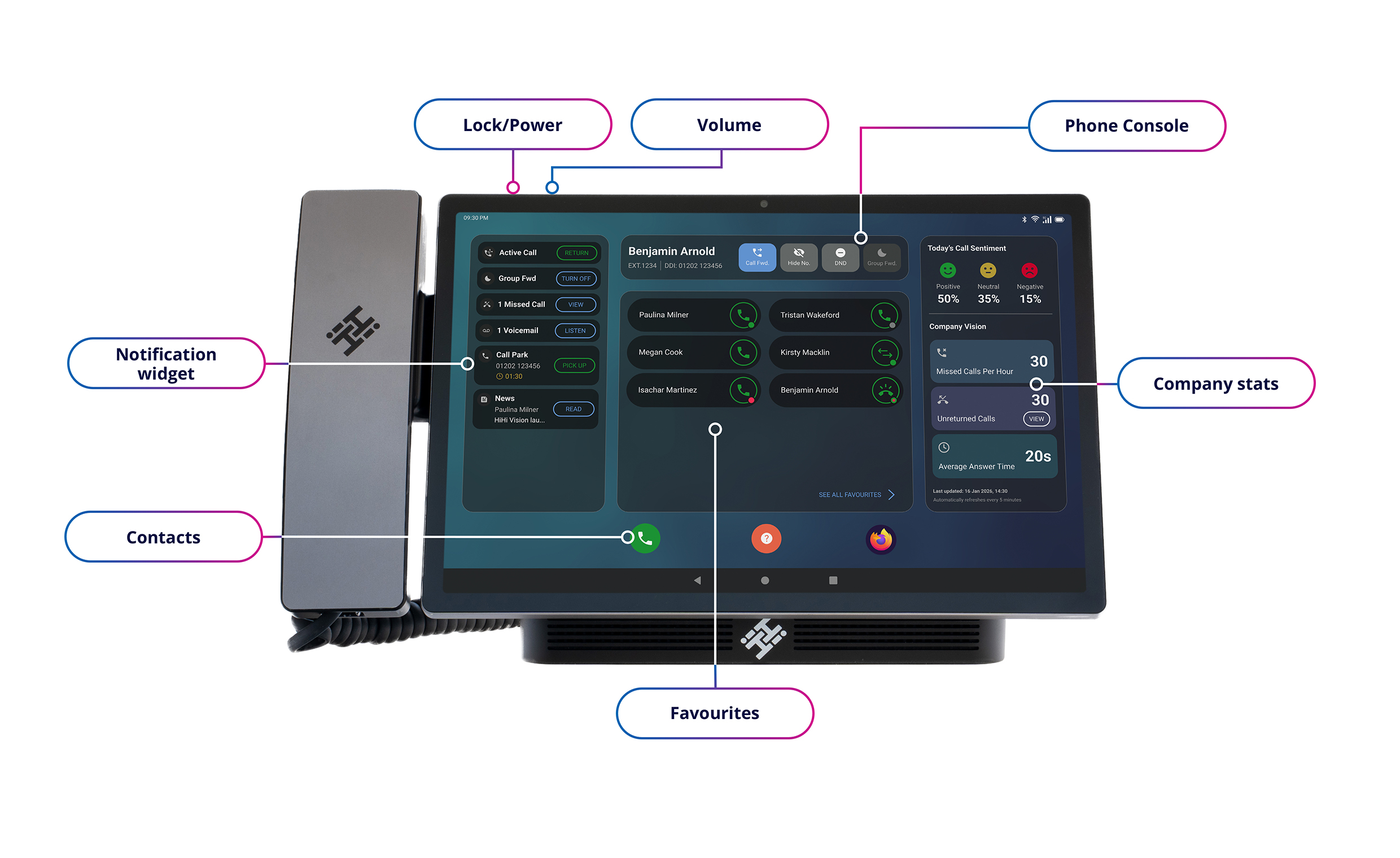
The home screen is designed to give quick access to key features and information.
Left side: Notifications like missed calls and news alerts
Top bar: Quick actions (such as Do Not Disturb, call forwarding, hide number)
Centre: Favourite contacts for quick access
Right side: Business-wide daily call insights and reporting
-
Make a call
- Tap the phone icon
- Either:
- Enter a number and tap Call, or
- Select a contact and tap the Call icon next to their name
-
Put a call on hold
- When on an active call, tap Hold
- Tap Resume to continue the call
-
Use call pickup
Call pickup allows you to answer a call ringing on another user’s HiHi Vision.
- When a contact’s phone is ringing, a ringing indicator will appear
- Tap the indicator
- You will be connected to the caller
-
Direct call transfer
A Direct Transfer sends the call straight through without speaking to the other person first.
- While on a live call, tap Transfer
- Select a contact
- Tap Direct
- The call is transferred immediately
-
Consult transfer of a call
A consult transfer allows you to speak to the person before transferring the call.
- While on a live call, tap Transfer on the call screen
- Select a contact
- Speak to them to confirm the transfer
- Tap Transfer again
- Confirm to complete the transfer
-
Configuring call forwarding
Call forwarding lets you redirect calls to another number depending on your availability.
- Tap the phone icon
- Tap the Settings icon
- Select Configure Call Forwarding
- Always forward – sends all calls to another number
- Forward when busy – when you are already on a call
- No answer forward – after a set number of rings
- Enter a number or select a cont
- Choose your preferred Forward Time
- Tap Save
When you return to the home screen, use the Call Forwarding icon at the top of the console to quickly turn call forwarding on or off.
-
Park a call
Parking a call places it in a shared queue so another authorised user can pick it up.
- While on a active call, tap Park Call
- The call will appear in the Notifications widget
- Another user can tap it to pick up the call
-
Add a new contact
You can quickly save numbers from your recent calls into your contacts.
- Tap the phone icon
- Tap Add contact
- Enter the contact details
- Tap Save
-
Add a contact from a recent call
You can quickly save numbers from your recent calls into your contacts.
- Tap thephone icon (bottom left)
- Find the number in your recent calls list
- Tap the number
- Choose:
- Add to existing to update a contact
- Create new to save as a new contact
-
Add a favourite
Favourites allow you to quickly contact people directly from your home screen.
- Tap the phone icon
- Open your contacts list
- Select a contact
- Tap Favourite
To remove a favourite
- Select the contact again
- Tap Favourite to remove it
-
Understanding your notifications
Notifications appear on the left-hand side of the home screen, giving you a clear view of activity that may need your attention.
Blue notifications indicate something that requires action, such as a missed call or voicemail.
Green notifications relate to any live call in progress.
-
Restart and power off
- Press and hold the top-left button
- Tap Restart or Power off
- To turn back on, press and hold the button again
-
Phone Settings
-
Change the ringtone
- Tap the phone icon
- Tap the Settings icon (top right)
- Scroll to Internal Ringtone
- Select your preferred ringtone
- Tap Save
-
Adjust the brightness
You can either let the device adjust automatically or control it manually.
- Swipe down on the home screen
- Toggle Adaptive Brightness:
- On – adjusts automatically based on your environment
- Off – allows manual control
- Use the slider to adjust brightness
-
Enable do not disturb
Do Not Disturb stops incoming calls from ringing through to your device.
Quick method
- Use the toggle at the top of the home screen
Via Settings
- Tap the phone icon
- Tap Settings
- Toggle Enable Do Not Disturb
-
Enable noise suppression
Noise suppression helps reduce background noise during calls.
- Tap the phone icon
- Tap Settings
- Scroll down
- Toggle Noise Suppression
-
Enable private calling
Private calling hides your number when making outbound calls.
Quick method
- Tap Hide No. on the home screen
Via Settings
- Tap the phone icon
- Tap Settings
- Toggle Private Calling
-
Manually sync your contacts
This allows you to update your device with the latest company contacts, if for any reason the automatic syncing has not worked quickly enough.
- Go to Settings
- Scroll to Miscellaneous
- Tap Sync Contacts
-
Artificial Intelligence (AI)
-
Using call insights
Call Insights gives you a detailed breakdown of your conversations.
- Tap the phone icon
- Select a contact
- Tap Call Insights
This will show a full overview of your call, including a summary of the conversation, sentiment analysis to help you understand how the call went, a full transcript, and suggested actions based on what was discussed.
-
Voicemail
-
Access and listen to voicemails
Voicemails are easy to access from your home screen, whether they are new or saved.
Listen to new voicemails
- Go to the home screen
- Check the Notifications widget on the left-hand side
- New voicemails will appear here
- Tap Listen
- You’ll be taken directly to the voicemail that needs actioning
Listen to historical (past) voicemails
- Scroll up on the Home screen
- Open the Visual Voicemail app
- This will show all saved voicemails
- Tap a voicemail to listen
Delete a voicemail
- Swipe left on the voicemail
- Tap Delete at the bottom of the screen
OR
-
Call Recording
-
Pause a live call recording
- While on an active call, tap Pause Rec to pause the recording
- Tap Record to resume recording
-
Other Questions
-
What won't I be able to do myself?
You may need our assistance for issues regarding:
- Connectivity
- Passwords (excluding device PIN and Google Account)
- Hunt Group setup
- Auto Attendant setup
- Group voicemail setup
- Name changes
- System programming
To request changes or report a fault, please visit https://www.mi4com.co.uk or call 0333 014 3001