HiHi User Resources
SEARCH
No results please try again
-
Getting Started.
-
Overview of the HiHi4 Phone Console
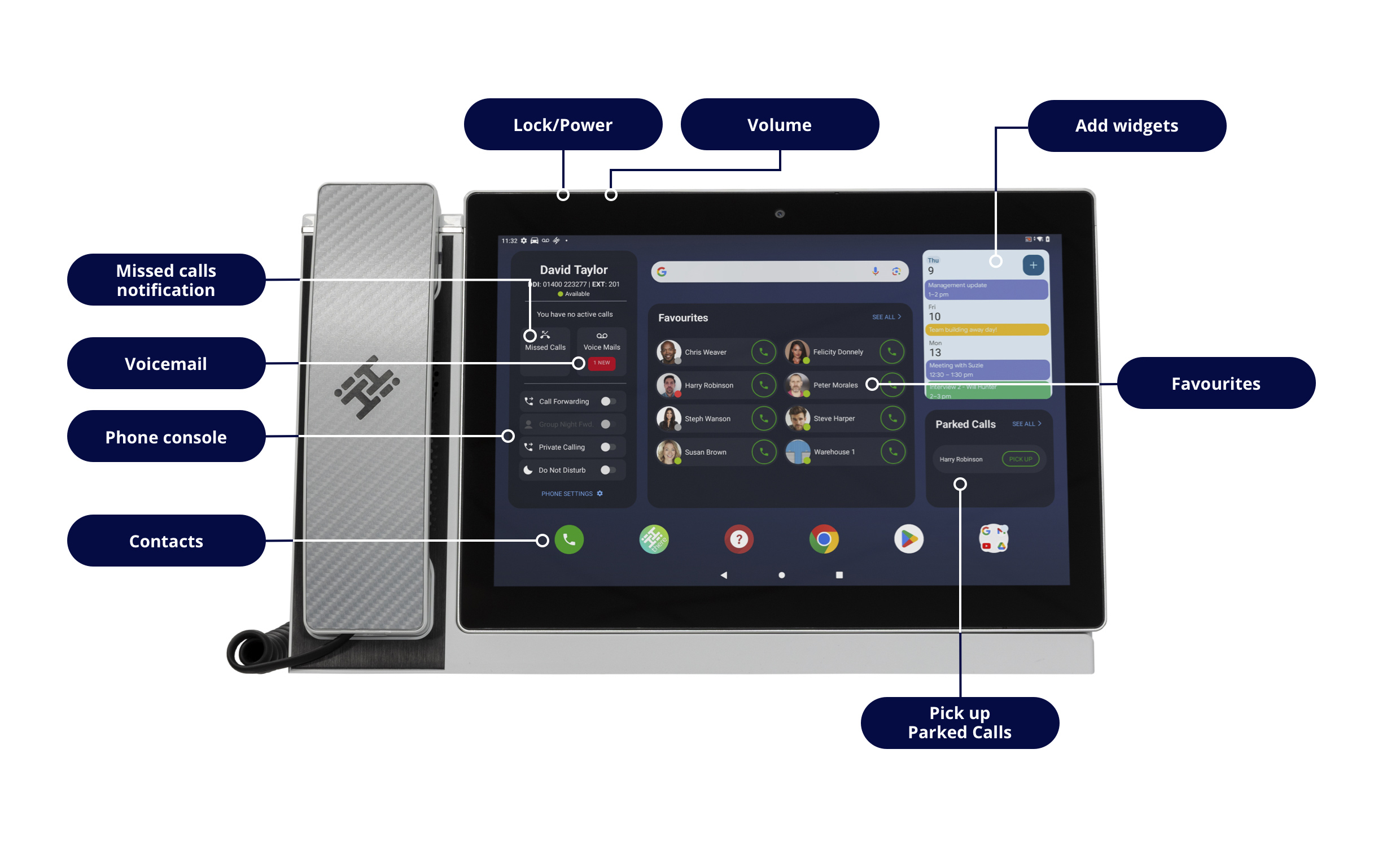
We have put together the most commonly used features in a nice, convenient location in the top left-hand corner of the screen.
Starting at the top your can see your Direct Dial Number and your Extension, as well as your Availability status.
Moving down you can see a button to take you directly to any Missed Calls, and your Voicemail button, which also shows how many unheard Voicemails are currently in your inbox.
Beneath those options, you can activate and deactivate your Call Forwarding, Private Calling and Do Not Disturb as you wish. You can also access your phone settings from this area.
-
Direct Call Transfer
- Whilst on a call, press the "Transfer" icon, found in the control panel. Please be aware that the caller can still hear you at this point. If you’d prefer for the caller not to hear you, please press hold.
- Pressing the “Transfer” button will take you to the Contacts page. Against each contact, there are two or three options available. Press the "Direct" button on the contact you wish to transfer the call to.
- If the contact has more than one number saved, the Contact Card will appear, so that you can select the phone number you need.
- Pressing the number transfers the call.
-
Consult Transfer of a Call
- Whilst on a call press the "Transfer" icon, found in the control panel, which will bring up the Contacts list.
- Press the "Consult" button to call the contact you want to transfer the call to. If the contact has more than one number saved, the Contact Card will appear, allowing you to select the correct number.
- Press Call.
- Now that you're connected to your contact, you can let them know about the call you'd like to transfer to them.
- When you are ready, you can press "Transfer".
- A pop-up window will appear, showing "Transfer to" and all active calls. Press on the name of the original caller to connect them with your contact.
-
Configuring Call Forwarding
- Firstly, you need to press “Call Settings” on the left-hand side of your HiHi4 homescreen. This will take you into the setting menu.
- From the menu, please press “Configure Call Forwarding, which will take you to the call Forwarding options screen.
- On this screen you will see your forwarding options.
- Always Forward is self-explanatory, and in this row you can press “Select Contact” to choose which internal contact you wish to forward your calls to, but you can also enter an extension or alternative number on the left of the display.
- Forward When Busy, will forward the call if you are displayed as Unavailable for any reason, and again you can select a contact from the Contacts List, or enter a number of your choosing.
- No Answer Forward, as the name suggests, will forward the call if you do not answer. Again, select a Contact or enter a number for the call to be forwarded to. You can also select the amount of time to elapse before this option applies.
- When you’ve finished, please select “Save and Finish” to complete your Call Forwarding setup.
-
Make, Hold and Resume a Call
- To make a call, press the Phone icon in the bottom-left corner, and you can either enter the number you wish to dial, or you can select it from your Contacts List.
- You can also type a name into the search bar at the top of the screen, to save you scrolling through all of your contacts.
- When you are on a call, if you wish to place them call on hold, press “Hold”. When you are ready to return to the call, press “Resume”.
- To make a call, press the Phone icon in the bottom-left corner, and you can either enter the number you wish to dial, or you can select it from your Contacts List.
-
Adding a Contact
- In order to add the contact, you need to go the Phone App, which you can do by pressing the phone icon in the bottom-left corner of the homescreen.
- From here, select “Recent Calls” in the top navigation.
- You will see a list of calls. Select the number you wish to add as a contact.
- You can either “Create New” or, if you are looking to add the number to an existing contact, select “Add to Existing”.
- Complete the relevant details and press save to complete it.
TIP: If the number you wish to add isn’t in your recent calls list, select the Contacts icon in the bottom-right corner of the Phone App screen, add their details and press save.
-
Add a Favourite
- A favourite is a commonly used contact, and is visible from the homescreen.
- To add a new favourite, press the Phone icon in the bottom-left corner of the homescreen.
- Go through your contacts until you find the person you wish to add as a favourite.
- Select the contact and press the star.
- You will now see that this person is added as a favourite on the homescreen.
- To remove them as a favourite, simply go into their contact and press the star once again.
-
Phone Settings
-
Changing the Ringtone
- From the homescreen, swipe up from the bottom to reveal the menu.
- Find the settings icon.
- Go to sound.
- Select Phone Ringtone.
- Select your preferred Ringtone and press ok.
-
Your Device, Your Way
-
Changing the Wallpaper
- From the homescreen, swipe up from the bottom to reveal the menu.
- Find the settings icon.
- Select Wallpaper.
- Select Photos.
- Select Downloads.
- Select the Wallpaper you with to use and press “Set Wallpaper”.
-
Add a Widget to the homescreen
- To begin, perform a long press on a blank area of the homescreen. This will open a small menu.
- On this menu, select “Widgets”.
- Choose your desired Widget from the extensive list.
- Perform a long press on the Widget and then place it into the desired location on your Homescreen.
Widgets are simplified versions of apps; they can come in all shapes and forms, such as E-mail, Weather, Calendars and many more.
-
Call Recording
-
Listen Back to Call Recordings
- To access your call recordings, first press the call button in the bottom-left corner of the homescreen.
- Next, press “Recent Calls” in the top navigation.
- Scroll through your recent calls to find the call you are interested in, and press “Play Rec”.
- At this point, the phone will ask you to enter your password.
- You will also be asked if you want the system to remember your password, but we would advise against this in most cases for security reasons.
- When you are in the call Recording player, you can press play, fast forward to any particular part of the call, and of course press stop.
-
Other Questions
-
What won't I be able to do myself?
The vast majority of the advice here is centred on how you can tailor the HiHi4 to meet you needs, i.e "Your Device, Your Way". However there are some things you will need our help for, namely:
- Connectivity Issues
- Password Reminders (excluding device PIN and Google Account)
- Hunt Group Setup
- Auto Attendant Setup
- Group Voicemail Setup
- Name Changes
- Any other system programming
To request these changes or report a fault, please visit https://www.mi4com.co.uk or call 0333 014 3001