HiHi User Resources
SEARCH
No results please try again
-
Getting Started.
-
Making a Call
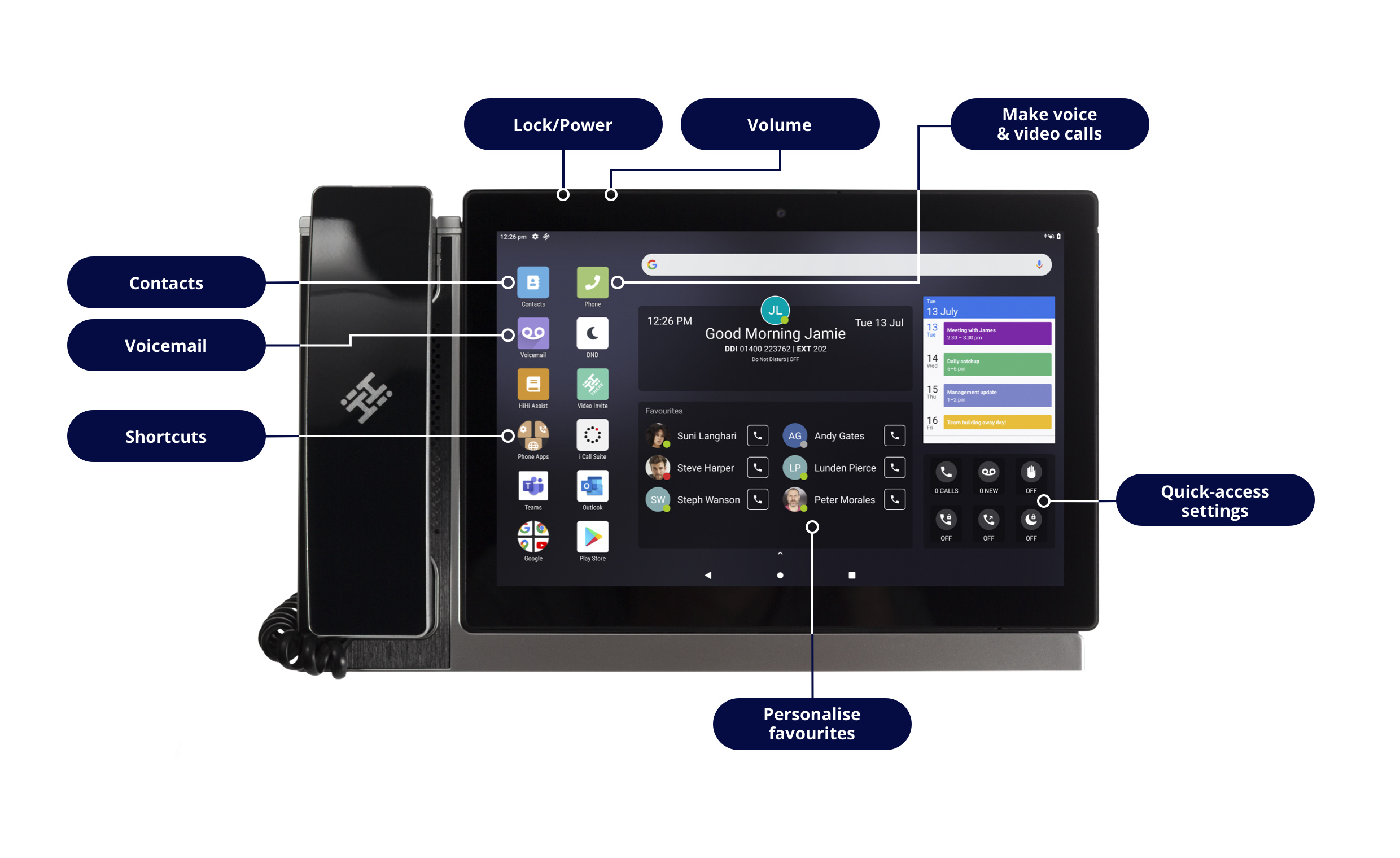
- To make a call, press the Phone icon on your homescreen.
- Enter the number you are wishing to dial using the keypad and press the green phone icon to initiate the call.
- If you are calling a saved contact, you can scroll through your Contacts, Favourites and Recent Calls list to find the name. Select the name or number you wish to dial.
- If they have multiple numbers saved, their Contact Card will appear. Select the number and it will initiate a call.
- Alternatively, you can search for a saved contact by name. Internal contacts will have a phone icon alongside their extension number so you can quick call them.
TIP: If you know the person you are calling is not a saved contact, lift the handset receiver to get to the keypad screen quicker.
-
Putting a Call on Hold
- During a call, press the hold option to put a caller on hold.
- Once the caller is on hold, you can resume the call by pressing the resume option to take you back to the caller.
-
Direct Transfer of a Call
- Whilst on a call, press the "Transfer" icon, found in the control panel.
- This will take you to the Contacts page. Against each contact, there are two or three options available. Press the "Direct" button on the contact you wish to transfer the call to.
- If the contact has more than one number saved, the Contact Card will appear, so that you can select the phone number you need.
- Pressing the number transfers the call.
-
Consult Transfer of a Call
- Whilst on a call press the "Transfer" icon, found in the control panel.
- Press the "Consult" button to call the contact you want to transfer the call to. If the contact has more than one number saved, the Contact Card will appear, allowing you to select the correct number.
- If you opt to press the "Quick Dial" button will call the extension number. Be aware that the original call is not on hold until you have begun dialling the recipient. Once connected, the original call will automatically be put on hold.
- Now that you're connected to your contact, you can let them know about the call you'd like to transfer to them.
- When you are ready, you can press "Transfer".
- A pop-up window will appear, showing "Transfer to" and all active calls. Press on the name of the original caller to connect them with your contact.
-
Add a Contact
- From the home screen, press the Phonebook icon.
- Manually enter the number of the contact you are wishing to add. The number will be displayed in the main part of the screen.
- Press on the “Add to contact” option, shown on the main part of the screen.
- A pop-up will appear, asking whether to add this number to an existing contact or to create a new contact. If you are creating a new contact, press this option, enter the contact’s details and save.
- If you are wishing to add the number to an existing contact, press this option and another pop-up will appear, asking you to search for the contact. Type in the name of the person and select the contact that you wish to add the number to.
- You can also save a number from a recent call. Go to the Recent Calls list within your Phonebook and click on the number you wish to save. A pop-up will appear again, asking if you wish to add to an existing contact or create a new contact. You can then follow the same process as before.
-
Add a Favourite Contact
- From the home screen, press the Contacts icon.
- Find the contact you wish to add as a Favourite by typing their name in the search bar. Select the contact from the list of contacts who may appear by pressing on their name.
- A pop-up will appear of the contacts details. Click on the star icon at the bottom of the pop-up. This will then add the contact to your Favourites list.
- If you have the Favourites widget added to your home screen, this contact will now appear there, giving you a quick way to dial them. Your Favourites can also be found in a separate Favourites list within your Phonebook.
-
Phone Settings
-
Connect your HiHi3 to WiFi
Your HiHi3 phone is designed to make remote working easier, giving you a deskphone that you can simply unplug from your office desk and use elsewhere in the office or take home with you when needed.
Taking both your base unit and tablet home, (or getting an additional base unit for your desk at home), means you can easily stay connected with your colleagues and customers, as well as access all your contacts, files and apps that are saved to your HiHi3.
Please follow the steps below to connect your HiHi3 to WiFi.
- Swipe up from the bottom of the homescreen to display all the applications on your device. Select the Settings icon.
- Select the top option "Network and Internet".
- Finally, select "WiFi". This will display a list of available WiFi networks that you can connect to.
- Select the WiFi network you would like to connect to. A pop-up will appear asking for the password. Depending on the network, it may also ask for other details including username.
- Enter the password and then press Connect. If successful, it will display as connected. Your HiHi3 is now connected to the internet.
-
Lock, Turn Off & Restart Your HiHi3
Please read the following steps to learn how to lock, turn on/off and restart your device.
- On top of your tablet device, there is a button to the left which is both your lock and power button. To lock your device, press the button once.
- To unlock your device, press the button again. It will then show you a locked home screen. Swipe upwards to unlock. If you have a security pin, you will need to enter this to unlock your device.
- To turn the power off or restart your device, long press the power button on the top of your tablet. Two options will appear to the right of your screen. If you choose to restart, your device will automatically restart itself. If you choose to power off, you will need to long press the power button to turn it back on.
-
Your Device, Your Way
-
Signing into Google Play Store
HiHi3 is a certified Google device, giving you access to the Google Play Store and its suite of apps. Please follow the below steps to learn how to sign in to Google Play Store.
- To access, click on the Google Play Store icon on the bottom left-hand of your homescreen.
- When you initially click on the icon, you will be greeted with a “Sign In” screen. If you already have a Google account, enter your email address and password to sign in. If you don’t already have an account, you can create one by clicking “Create account”.
- Once you are signed in, you will have access to the Google Play Store, with the ability to download any app to your device. You will also be able to access your emails, photos and files from your Google account through the various Google apps which are pre-installed into your HiHi3.
* 4Com does not offer support for any third-party applications or your Google account, For support, you will need to contact either Google or the third-party company.
-
Voicemail
-
Accessing your Voicemail
- To access your messages, click on the Voicemail icon on the home screen.
- This will take you to all of your voicemails, where you can play them individually and easily scroll through the message to repeat certain sections.
- To delete messages, just swipe left on the message bar which will remove it from your saved voicemails list.
-
Other Questions
-
What won't I be able to do myself?
The vast majority of the advice here is centred on how you can tailor the HiHi2 to meet you needs, i.e "Your Device, Your Way". However there are some things you will need our help for, namely:
- Connectivity Issues
- Password Reminders (excluding device PIN and Google Account)
- Hunt Group Setup
- Auto Attendant Setup
- Group Voicemail Setup
- Name Changes
- Any other system programming
To request these changes or report a fault, please visit https://www.mi4com.co.uk or call 0333 014 3001